
Flutter Offline-First App Development: A Beginner's Guide
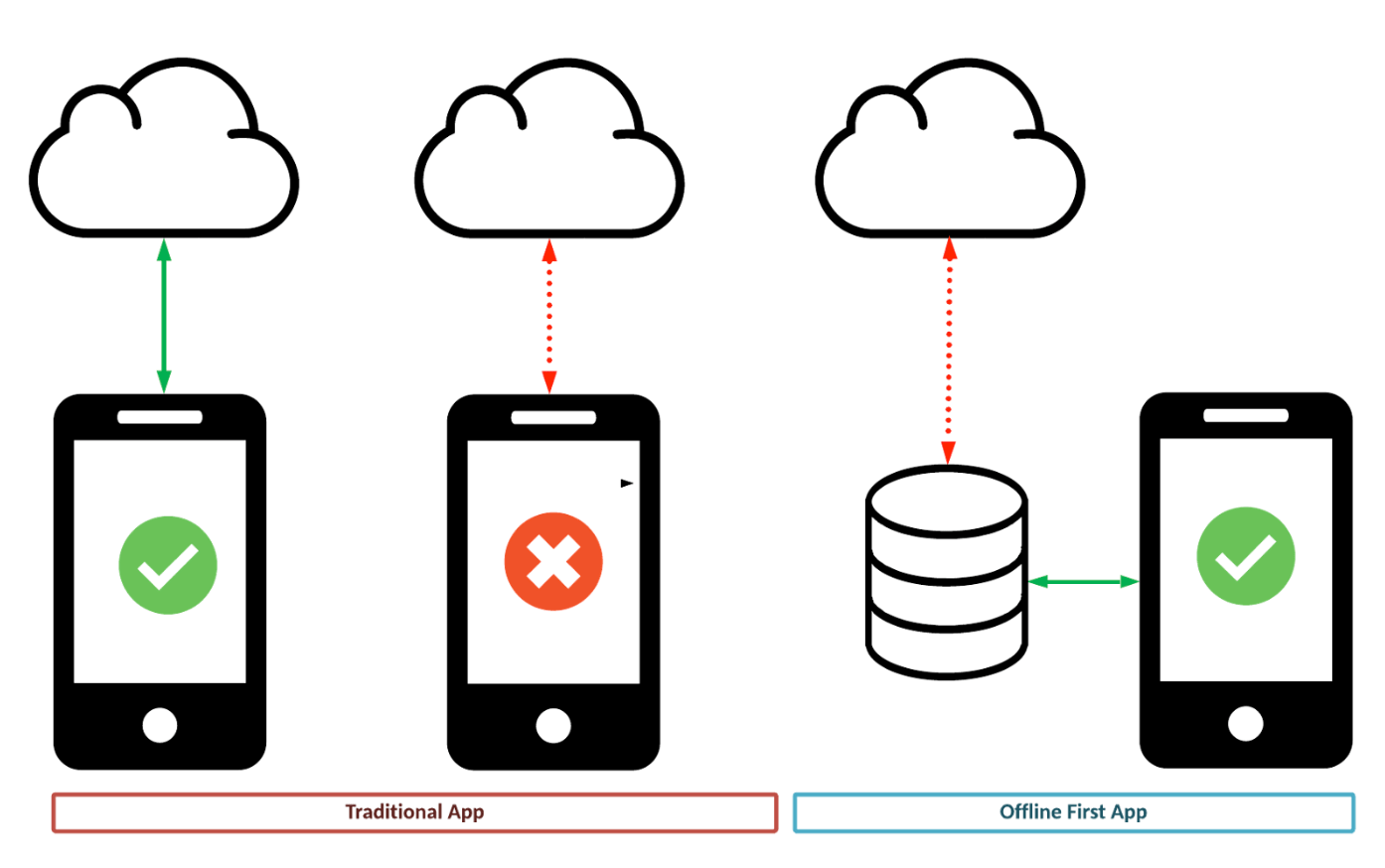
Say part of your app needs a live connection to work — a news feed, a product catalog, anything backed by a server. Offline-first means the app still shows the user something useful without a connection: the last data it successfully fetched, refreshed silently in the background the next time a connection is available.
This guide builds that pattern for real, with runnable code at every step — a news feed using a public API, cached locally, served from cache the moment the network fails rather than as an afterthought.
The tools, and why each one
Dio for the network layer — it gives us interceptors and clean error typing, which matters once we need to distinguish "no connection" from "server error" reliably.
Hive for caching the structured API response — not flutter_cache_manager, which is built and best known for caching files (particularly images) with automatic expiry, not structured JSON data. Hive is a fast, simple key-value store that's the more conventional choice for exactly this job: caching a list of articles as data, not as a file.
flutter_cache_manager kept for the one thing it's genuinely built for in this app: caching the article thumbnail images, which are files.
connectivity_plus to detect whether we're online before deciding which path to take.
Provider for state management, tying the repository's output to the UI.
dependencies:
  dio: ^5.4.0
  hive: ^2.2.3
  hive_flutter: ^1.1.0
  flutter_cache_manager: ^3.3.1
  connectivity_plus: ^6.0.0
  provider: ^6.1.1
The article model
import 'package:hive/hive.dart';

part 'article.g.dart'; // generated by build_runner — see Hive's codegen docs

@HiveType(typeId: 0)
class Article {
  Article({required this.title, required this.description, required this.url, required this.imageUrl});

  @HiveField(0)
  final String title;
  @HiveField(1)
  final String description;
  @HiveField(2)
  final String url;
  @HiveField(3)
  final String imageUrl;

  factory Article.fromJson(Map<String, dynamic> json) => Article(
    title: json['title'] ?? '',
    description: json['description'] ?? '',
    url: json['url'] ?? '',
    imageUrl: json['urlToImage'] ?? '',
  );
}
The @HiveType/@HiveField annotations are what let Hive store this as a real typed object rather than a raw map — run dart run build_runner build after adding them to generate article.g.dart.
Setting up Hive
Future<void> main() async {
  WidgetsFlutterBinding.ensureInitialized();
  await Hive.initFlutter();
  Hive.registerAdapter(ArticleAdapter());
  await Hive.openBox<Article>('articles');
  runApp(const MyApp());
}
The repository: network-first, cache as the explicit fallback
This is the part that actually makes the app offline-first rather than just "caches things as a side effect." The order matters: try the network, and only fall back to cache when it genuinely fails — not as an optimization to avoid network calls, but as the path that keeps the app usable when there's no connection at all.
class NewsRepository {
  NewsRepository(this._dio, this._box);

  final Dio _dio;
  final Box<Article> _box;

  Future<List<Article>> getArticles() async {
    final connectivity = await Connectivity().checkConnectivity();
    final hasConnection = connectivity != ConnectivityResult.none;

    if (hasConnection) {
      try {
        final response = await _dio.get(
          '${ApiConstants.baseUrl}/top-headlines',
          queryParameters: {'country': 'us', 'apiKey': ApiConstants.apiKey},
        );
        final articles = (response.data['articles'] as List)
            .map((json) => Article.fromJson(json))
            .toList();

        await _box.clear();
        await _box.addAll(articles); // cache is refreshed only after a successful fetch

        return articles;
      } on DioException {
        // Network reported available but the request still failed —
        // treat it exactly like being offline rather than crashing.
        return _getCachedArticles();
      }
    }

    return _getCachedArticles();
  }

  List<Article> _getCachedArticles() => _box.values.toList();

  bool get hasCachedData => _box.isNotEmpty;
}
Two things worth calling out: Connectivity().checkConnectivity() reports whether a network interface exists, not whether the API call will actually succeed — which is why the try/catch around the Dio call exists as a second layer, catching the case where the phone thinks it's online but the request fails anyway (a weak signal, a captive portal, a server outage). And the cache is only overwritten after a successful fetch, never before — a failed request should never wipe out data that was working a moment ago.
Surfacing staleness to the user
The part offline-first guides skip most often: the UI should tell the user when they're looking at cached data, not just silently serve it as if it were fresh.
class NewsController extends ChangeNotifier {
  NewsController(this._repository);
  final NewsRepository _repository;

  List<Article> articles = [];
  bool isOffline = false;
  bool isLoading = false;

  Future<void> loadArticles() async {
    isLoading = true;
    notifyListeners();

    final connectivity = await Connectivity().checkConnectivity();
    isOffline = connectivity == ConnectivityResult.none;

    articles = await _repository.getArticles();
    isLoading = false;
    notifyListeners();
  }
}
class NewsScreen extends StatelessWidget {
  const NewsScreen({super.key});

  @override
  Widget build(BuildContext context) {
    return Consumer<NewsController>(
      builder: (context, controller, _) {
        if (controller.isLoading) return const Center(child: CircularProgressIndicator());

        return Column(
          children: [
            if (controller.isOffline)
              Container(
                color: Colors.amber.shade100,
                padding: const EdgeInsets.all(8),
                child: const Text('Offline — showing saved articles'),
              ),
            Expanded(
              child: ListView.builder(
                itemCount: controller.articles.length,
                itemBuilder: (context, i) {
                  final article = controller.articles[i];
                  return ListTile(
                    leading: CachedNetworkImage(
                      imageUrl: article.imageUrl,
                      cacheManager: DefaultCacheManager(), // flutter_cache_manager, for the image file specifically
                      errorWidget: (context, url, error) => const Icon(Icons.image_not_supported),
                    ),
                    title: Text(article.title),
                    subtitle: Text(article.description),
                  );
                },
              ),
            ),
          ],
        );
      },
    );
  }
}
That amber banner is a small addition with an outsized effect on trust — a user who sees three-hour-old headlines with no indication they're stale will assume the app is broken or slow; the same user shown "Offline — showing saved articles" understands exactly what's happening and why.
Refreshing silently when connectivity returns
Listen for the transition back online and refresh automatically, rather than waiting for the user to pull-to-refresh into a connection that's already back:
class NewsController extends ChangeNotifier {
  // ...previous fields...
  StreamSubscription<List<ConnectivityResult>>? _connectivitySub;

  NewsController(this._repository) {
    _connectivitySub = Connectivity().onConnectivityChanged.listen((results) {
      if (isOffline && !results.contains(ConnectivityResult.none)) {
        loadArticles(); // connection just came back — refresh quietly
      }
    });
  }

  void dispose() {
    _connectivitySub?.cancel();
    super.dispose();
  }
}
Cache invalidation: the part most offline-first tutorials skip entirely
Serving cached data indefinitely without any expiry means a user who hasn't opened the app in three weeks sees three-week-old headlines with no signal that anything is wrong. Store a timestamp alongside the cache and use it to decide whether to show a staleness warning even while online-but-serving-cache in edge cases, or to force a background refresh past a certain age:
Future<void> _cacheArticles(List<Article> articles) async {
  await _box.clear();
  await _box.addAll(articles);
  await Hive.box('meta').put('articles_cached_at', DateTime.now().toIso8601String());
}

bool get isCacheStale {
  final cachedAtStr = Hive.box('meta').get('articles_cached_at') as String?;
  if (cachedAtStr == null) return true;
  final cachedAt = DateTime.parse(cachedAtStr);
  return DateTime.now().difference(cachedAt) > const Duration(hours: 6);
}
Six hours is an arbitrary starting point — the right threshold depends entirely on how time-sensitive the data is; a news feed and a product catalog have very different reasonable staleness windows.
Conclusion
Offline-first isn't "cache things for performance and hope it also helps offline" — it's a specific architecture where the fallback to cache is an explicit branch triggered by a failed or absent connection, the cache is only ever refreshed after a successful fetch, staleness is visible to the user rather than silent, and reconnection triggers a refresh without the user having to ask for one. None of that requires complex tooling — Hive for the data, flutter_cache_manager for the images it's actually built for, and connectivity_plus to know which path to take — but it does require treating "offline" as a real, designed-for state rather than an edge case the caching happens to soften.
A full working example combining all of the above is available at github.com/Nicopee/News-App.
References
About the author
- Hello, I am a senior Flutter developer with vast experience in crafting mobile applications. I am a seasoned community organizer with vast experience in launching and building Google Developer communities under GDG Bugiri Uganda and Flutter Kampala.
Comments
Join the discussionNo comments yet. Be the first to comment.


